

Download the App & Start Learning
- Expert Faculty Guidance
- Updated Study Material
- Mock Tests & Practice Quiz
- Live Doubt Solving Sessions
- Exam-Oriented Preparation
- Motivation & Success Strategy
Katara Academy

22/11/2026
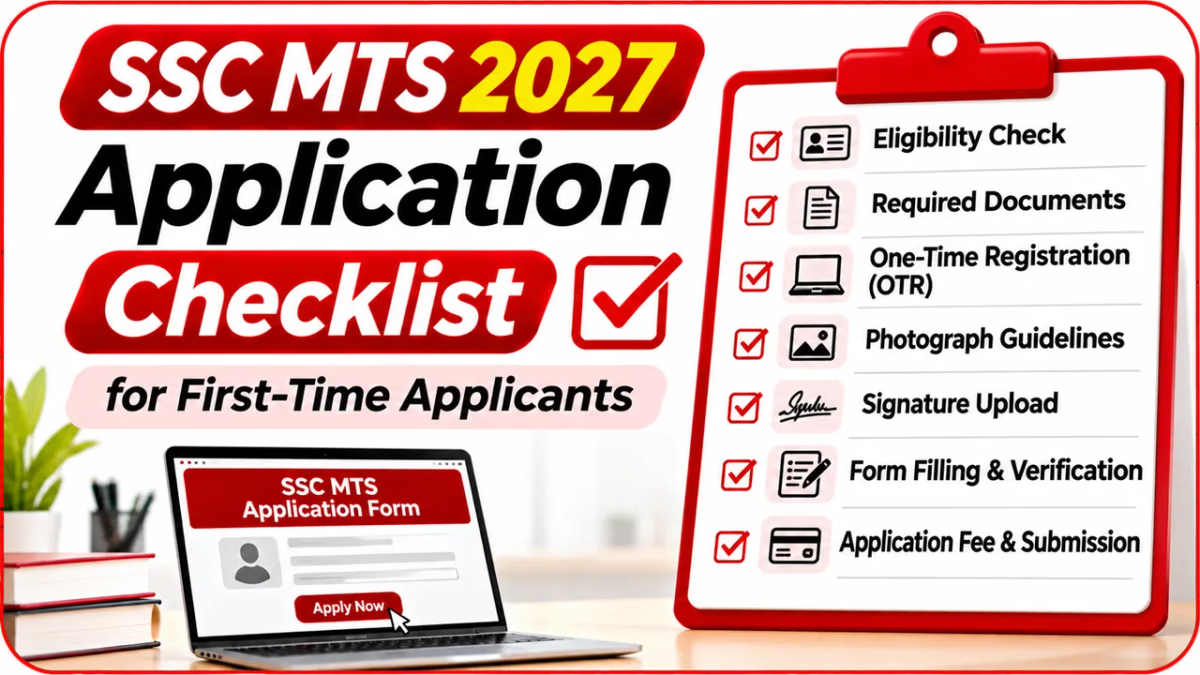
Applying for SSC MTS for the first time can feel confusing, especially when you are unfamiliar with One-Time Registration (OTR), document details, photograph instructions and the application submission process. A small mistake in personal information or an incomplete application can create unnecessary problems later.
Before starting the SSC MTS 2027 application, it is important to prepare your documents, check eligibility details and understand each step of the online process. This guide provides a simple application checklist for first-time applicants so you can complete your form carefully and confidently.
Before registering, check the eligibility requirements mentioned in the official SSC MTS 2027 notification. Candidates should carefully verify the following details:
Do not assume that eligibility rules will remain exactly the same as the previous year. Always check the latest notification before applying.
First-time applicants should arrange important information before opening the application portal. This reduces the chances of entering incorrect details or having to stop halfway through registration.
| Required Information | Why You Need It |
|---|---|
| Active mobile number | OTP verification and communication |
| Active email address | Registration and application updates |
| Aadhaar or permitted alternative ID details | Registration and identity verification as instructed |
| Class 10 certificate / marksheet | Name, date of birth and matriculation details |
| Class 10 board details | Board name, roll number and passing year |
| Category certificate, if applicable | Supporting category claims when required |
| PwBD certificate details, if applicable | Disability-related declarations and facilities |
| Signature image | Upload as required by the application instructions |
| Access to camera/device | Live photo capture if required by the application system |
SSC's 2025 application instructions required candidates to prepare verified mobile and email details, identity information, matriculation details and applicable disability-certificate information before OTR. The exact requirements for 2027 should be checked in the current notice.
One-Time Registration is an important step before applying for an SSC examination. Candidates who already have a valid registration on the current SSC portal should check whether they can use it instead of registering again.
First-time applicants can follow this preparation sequence:
Never share your password or OTP with unknown people or unofficial agents.
Photograph instructions are especially important because the SSC application process may require a live photograph captured through the application module rather than an ordinary pre-existing photograph.
Before capturing your photograph, check the following:
Follow the photograph instructions displayed in the official application form. Requirements may change for the 2027 examination.
If the application requires a signature upload, prepare it according to the latest prescribed format.
The SSC MTS 2025 notice specified a JPEG signature upload of 10–20 KB with approximate dimensions of 6 cm × 2 cm. Treat this as a previous-cycle reference only, not a confirmed 2027 requirement.
After completing the required registration steps, proceed to the SSC MTS application form. Enter details carefully and verify each section before moving forward.
Ensure your name and date of birth match your matriculation records. Avoid spelling mistakes, incorrect dates or selecting a category without the required supporting documents.
Do not submit the application without checking the preview. A final review helps you identify mistakes while you still have an opportunity to correct them through the permitted process.
Use this verification checklist:
SSC's 2025 notice specifically advised candidates to use the Preview/Print option to check the entered details and the photo/signature before submitting the application.
Before paying the application fee, check the official notification for the applicable fee amount, exemptions and accepted payment methods.
Do not rely only on a bank debit or payment screenshot. Confirm that the application portal shows the appropriate payment or submission status.
After submitting your SSC MTS application, keep copies of important records for future reference.
Saving your application copy is useful if you need to review details later, check application status or refer to information during subsequent examination stages.
Filling the form early and checking every field can help avoid last-minute technical problems.
Use this checklist before, during and after your application process.
Keep your active mobile number, email, identity details, Class 10 board and passing information, applicable category or disability certificates, and any photo/signature requirements listed in the official notification.
SSC's application process uses One-Time Registration before examination applications. Check the current SSC portal and instructions to confirm whether your existing registration is valid.
Do not assume an old photograph is acceptable. The SSC MTS 2025 instructions required live photo capture through the application module. Follow the photo instructions for the 2027 application.
Review the preview before final submission. If the form has already been submitted, check whether SSC announces an application correction window and follow the correction rules in the official notification.
Yes. Download or save your final submitted application and payment confirmation, if applicable. Keep them safely for future reference.
Log in to the official SSC portal and check the application status or confirmation displayed for your examination. Save the confirmation details for your records.
Apply only through the official Staff Selection Commission website or another application channel explicitly authorised in the official notification. Avoid unofficial application links.
For first-time applicants, the SSC MTS application process becomes much easier when all documents and details are prepared in advance. Check your eligibility, complete registration carefully, follow photo and signature instructions, review the form and save the submission confirmation.
Do not rush through the application process. A careful checklist can help you avoid common errors and keep your SSC MTS 2027 application organised from registration to final submission.
Build a clear application and study system, practise regularly and stay prepared for your upcoming SSC examination.